
|
Quote:
|
That's not a bad idea -- either an autocomplete textbox or a dropdown, though, I wouldn't want anyone to try to remember to type "TNT (armed explosive, no pickup)" -- but on the other hand I don't think you'd want every parameter box to exhibit that behavior all of the time anyway, not least because they're sized for numbers, not for text. And all restrictions on input could certainly be turned off in those special cases you might want to choose an event.
ETA: Okay, now you can drag an event from the tree list onto a parameter box and it'll fill in the event number. |
Hey UR, awesome project you've got here! I'm checking the "watch this thread" button for sure, it looks very promising.
If I could be put to any use, just |
Quote:
Feels good to live in 2011. |
++2011
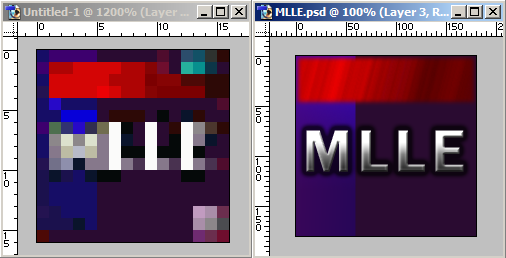
Work on the event window continues, largely because all that bitwise display and modification is complicated business. :| More importantly, though, another opportunity for people to be helpful to this project!  That's the clearest version I've been able to find of the icon for the original MLLE, but while it's 16x16, it's also got .jpg artifacts. Any creative folks out there feel like redoing it for authenticity value? |
Hey Unknown Rabbit, in order to keep out outside distractions, have you considered a fullscreen mode? That would be especially useful to those of us with dual monitors.
Would it be possible to add support for up to 99 triggers and 99 text strings? I know it can be done. Also, maybe a "level preview" option? Kinda like parallax display, but without having to "save and run" the level. Maybe if you were to click it or press the hotkey, another "preview box" window would pop up, showing a frozen sprite for the enemies and trigger crates and such? |
Quote:
|
Quote:
Quote:
Quote:
As a general rule, things that are completely feature ideas/requests and not pertaining to specific design things I'm talking about are probably better placed in the big thread, especially since that way you can look through the thread in advance and make sure your idea hasn't already been posted. |
 Revised Layer Properties screen as you can expect to see it 99% of the time. (Limit visible region goes disabled whenever Texture mode or Tile height are checked.)  However, if you have more than one texture mode in the .ini file, then the familiar combobox reappears. All parameters (including the stars checkbox) have names specified per texture mode in the .ini.  Finally, for Battery Check and other versions with no texture properties at all, the window is simplified even more, copying the layout from BCCS. ETA: And now this window actually works as well as just looking pretty. Layers: resizable! |
So, the texture mode stuff basically means that you get presets and don't have to set everything up each time?
|
Quote:
|
Ah, thanks for explaining.
|
Very nice work! Also it's a great idea to remove/hide any features from the window if they're not available anyway.
|
It occured to me rather quickly that remaking the original icon is useless:
 So, I decided to try random things until I did something that I thought was decent:  I think it resembles the original well enough. At first I tried to recapture the "multi-layer" part of the name but couldn't without making it look dumb, so I settled for some cheap bevel and decided to call it a bunch of buttons. I also made a silly variation: 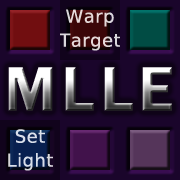 They even scale to 32x32 quite well!   |
Looks good to me; thanks muchly! I'd offer rep as well as thanks, but it says I have to spread some more around first. :(
|
Though, I dunno if it's a good idea to call it MLLE if it can't open .LEV files (yet?)
|
Am I being slow or is that just old stuff, where is that from? :P
|
Well, there are a lot of things it can't do at the moment. :P It's hoped to gain .lev support once someone figures out how they work, but the name is more a reference to the original MLLE, unlike JCS, using standard windows controls for scrollbars and buttons and stuff, instead of all those purple things. Arguably that distinction competes for salience with the .lev/,j2l difference and the much-increased usability of JCS (far fewer things hidden up in the top menustrip), but visually, gray vs. purple certainly stands out. And it rolls off the tongue better than, say, "JCS.NET."
Jake: Can't really answer that unless you use fewer pronouns? The original MLLE icon is old stuff, yes. |
I could try to find out anything about the .lev format. We actually know what's stored inside (a tileset image, a color palette, multiple layers of tiles, events, some settings...), but (as far as I know?) we don't know anything about how things are stored in there. I'm actually quite optimistic that I could get an overall view of the structure (and possibly already more than just that) without too much difficulties if my expectations are right.
|
Any investigation into .lev format should of course be informed by an understanding of .j2l and .j2t (and possibly, though unlikely, LEVELX.XXX and BLOCKS.XXX) formats, since there will likely be things in common. All I know offhand is that the event structure (EVNT), stored as the antepenultimate section(?) in .lev files, looks identical to its .j2l counterpart, and the final section is the color palette and is formatted in a straightforward RGBRGBRGB order without the useless alpha values from .j2t files. That said, such investigation should also probably take place in a separate thread
In the realm of the obvious, people should probably compare .lev files to their closest counterparts, e.g. battle1.j2l and castle1.j2t for battle1.lev. As far as I know, j2ff remains the best tool for extracting the data streams for .j2l and .j2t files; it doesn't work well for TSF levels, but fortunately that's not relevant here! |
Restoring lost posts from old hosting provider ;)
Quote:
Quote:
Quote:
Quote:
Quote:
Quote:
Quote:
|
A bit late here, but about the Illuminate Surroundings checkbox: isn't it used as a marker by quite a few utilities?
|
Update on .lev support: I was able to convert battle4 and race4 to 1.23! That's just opening code, and unfinished opening code at that; conversion and saving haven't even been touched yet. I think full .lev support will be the last feature to add prior to the first test release, although I've got a number of bugs and stability issues to track down before that too.
minmay: If you find some links to utilities that use that checkbox (preferably with accompanying documentation), I'd be happy to take a look at them and think it over. |
Okay, so I lied. LEV support includes conversion and saving, so I should be at release point, and yet here I am adding more things. In my defense, a lot of it is just adding error messages, but then there's this kind of stuff, which is just icing.
 In all, there are now five different input modes for a parameter:
|
Fun discovery: layer autospeeds don't actually go as high as 32767, the highest speed is 32 (or its whereabouts) and then it goes down to 64 which is no motion. Setting the speed to 63 has the same effect as setting it to -1, etc.
|
Well, they're measured in pixels, so a speed of 32 will move it a tile per tick, 64 will be two tiles per tick, etc. How they're related to negative speeds will depend on the size of the layer.
|
Quote:
|
http://www.tachyonlabs.com/sam/TESTScrollSpeeds.zip
One row repeats every 224 pixels; the other every 288. Play around. The really fast layer is 96 pixels wide and has an autospeed of 64 just to show that 64 != no movement. |
 And then I got distracted again. Not reading the parameters yet, but identifying the events is the first step... ETA: The Cupid enemy from the dining room level? Twenty-four parameters. That... that is just irresponsible game design. How do you even design an event editor window for that? |
Oh, nvm that. I see AGA has its own way of storing event data. |
Nope! AGA levels use their own data2 structure which I'm still working on. So those twenty-four parameters are actually twenty-two longs (= 88 bytes) plus two variably lengthed strings.
|
I guess you're gonna need an "Event Properties" button + window for that, I wouldn't recommend to put so many parameters in the event list window, haha
I wonder how they came up with that. Are there really so many possible options one could think of for a single event? |
The problem is, I suspect many AGA events are practically useless without their parameters set up right, so it might not be too wise to have all those boxes hidden from view. I think what I'm going to do is make sure everything saves properly and can be thoroughly edited within MLLE. Then whenever I get around to a test release, generous people can help with the work of figuring out what all the individual parameters do and setting up the .ini accordingly, which knowledge is not required for the programming itself.
(AGA, for whatever reason, ships with a file EventParams.ini which gives a few clues about how some of its events work. I'm not sure it's all 100% accurate -- it may be from an earlier version of the game -- but it definitely suggests that some of the parameters are going to be things like "angle of bullet," "whether bullet can go through walls," "can enemy jump," "what frame in the shooting animation does the bullet actually appear," etc. Lots and lots of events have string parameters, usually used to name another object (e.g. the switches) or sprite (e.g. bullets or shards from the stuff that Dot shatters). It's complicated and not at all in the same spirit as the rest of .j2l files.) |
I need to check this forum more than once every two weeks...
Quote:
Sorry to waste your time... |
 You know, B is great. Really great. But sometimes you just want a little more control than a single rectangle is going to offer you. And that's where Shift and Control come in handy. In other news, AGA support is doing well on at least the technical side, if not the understanding specific events side. You can edit their parameters just as well as those of ordinary events, with the interface more or less held constant between the two versions of the window, and as far as I can tell all the information is being saved properly. |
I can understand what Ctrl does, but what is with shift?
|
Same as in PSP and presumably other programs. Shift adds to an existing selection, Ctrl subtracts.
|
An awesome idea which no one thought of but everyone wanted!
|
Quote:
Most GUI's use Ctrl for add. (shift would then in this case be to remove stuff) |
I'm used to shift for add and ctrl for remove from GIMP and such. Most cases where Ctrl is add, Shift is for selecting large chunks at a time or something.
|
| All times are GMT -8. The time now is 04:59 AM. |
Powered by vBulletin® Copyright ©2000 - 2026, Jelsoft Enterprises Ltd.
JCF © 2001-Infinity Jazz2Online
