
|
I like cooba's version.
|
This set is turning into something I want to use! Hope it gets finished...
Anyway, here are the inside corner tiles for cooba's design, just so I can say I contributed something. Also, this file is smaller somehow. [img]http://www.cowmuffins.net/jazz/newocta03.png[/img] |
I'm wondering if the two colour lines are really needed. It's sort of hard to tell them apart, and it means basically twice the colours. And when that means almost 2 palette lines, it's eating them up pretty quickly.
|
Since they're probably a side effect of the Noise tool, I'd guess no.
|
[img]http://img11.imageshack.us/img11/8986/chujkurwa.png[/img]
Mushrooms(glowing mushroom animation is unfinished yet, I'll make that later). |
could you make the mushrooms more octagonal
(The redraw is looking great, peeps.) |
Well I can try but I dont think its easy to make good-looking octagonal mushroom.
|
Adding glowing mushrooms to tilesets is my job.
Anyway, I thought you redesigned the base tiles by the way of converting this tileset to some theme. I mean, where is that theme then? Ice and snow it was meant to be iirc. |
I couldn't find any ice or snow in it so I decided to put mushrooms.
Btw, maybe lest make octagonic temple/city covered with mushrooms? |
There was a brief informal poll on the last page and Jake, Sean, and Obi opted in favor of an ice-clad ruined city, with no opposition. How does one best differentiate a city from a castle/temple, anyhow, if they're both made of stone? Houses, I guess? Maybe a well?
(And if you were talking to me, I redesigned the base tiles because they didn't look plausibly solid.) |
[img]http://img62.imageshack.us/img62/8986/chujkurwa.png[/img]
Finished glowing mushroom animation. Edit: [img]http://i54.tinypic.com/2nqv85d.gif[/img] |
Okay, I've lowered the number of colours on the blocks and mushrooms, although cleaning up the blocks involved removing the noise, so perhaps it isn't as good. Oh, and I did the mushrooms before you finished the glowing animation, Ktos, so that's not there yet. Last but not least, I tried making some snow, so how does it look?
[img]http://img268.imageshack.us/img268/7820/lmat021.png[/img] And I realize I'm probably doing a little too much drawing for a collaborative project, so I'll sit back and watch a little. |
[img]http://img802.imageshack.us/img802/7820/lmat021.png[/img]
I haven't reduced number of colours because I have no idea in which way have you done it. Added ice, icicles, that mushroom animation and few snow tiles. |
The way in which I had done it was basically taking the outline and a few key colours and reshading it. Perhaps I'll have a go at the glowing animation just to keep them consistent. I like those icicles by the way.
|
Quote:
|
I'm not quite sure I like the mushroom idea. It doesn't blend in well with snow.
On a similar note, I did some research on Arctic plants. Wikipedia has never been more appreciated. I've been working on converting them into some pixel art version ever since. I'll probably borrow the colors off Jazz to keep the number of colors low. On another somewhat unrelated note, I'm going to keep with the ruined Roman city thing and start breaking everything. In the meantime, here is a poorly drawn and poorly dithered snow-blanketed ground. And some flowing off the sides. [IMG]http://i649.photobucket.com/albums/uu217/h3llb0yn3cr0/lmat022.png[/IMG] Just erase the bad text too. EDIT: Behold, my best contribution yet. [IMG]http://i649.photobucket.com/albums/uu217/h3llb0yn3cr0/lmat023.png[/IMG] I am especially proud of the way the columns turned out. I am actually at most an amateur pixel artist. I also added the blanketing snow to fill up onto a wall, and some other stuff going on. And if you guys really don't mind, please, fill in the space marked with a vine. I am terrible with vines. |
Nice. I'd better do those mushrooms.
|
Awesome pillars. I'll see if I can do some vines...
E: Vines failed :( |
Guys, how about we stick to the .bmp format? It'll be easier for everyone to keep track of the palette that way, and I can copy Jazz's colors off of the .pal file (or whatever extension you use) and draw the plants. If Obi's palette file is the only one there is, could he post either a .bmp file using the palette, or the palette itself?
In the meantime, a vine. Yay! [IMG]http://i649.photobucket.com/albums/uu217/h3llb0yn3cr0/lmat024.png[/IMG] Also, how does everyone feel about [IMG]http://i649.photobucket.com/albums/uu217/h3llb0yn3cr0/lmatproposedbg.png[/IMG] being the octagonic background? |
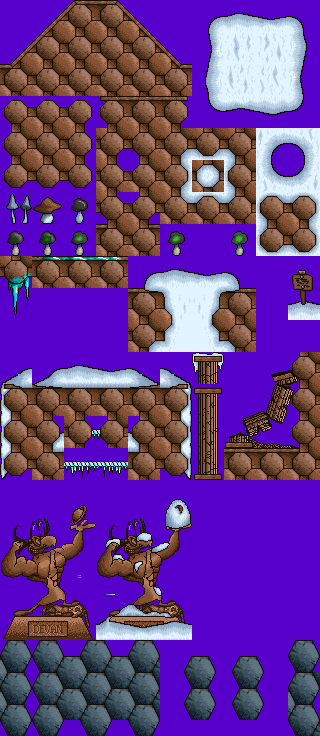 I added back in n00b's statue from the last version, adjusted for the expanded palette, and threw in an alternative proposal to Sean's cave background, (Regarding palettes: that's not currently possible because of, I think, the glowing mushrooms, which have taken us into 16-bit territory. If we can get those reduced, we can reinstate a palette. I stuck some reference gradients in there, though, to be useful.) |
Here, fixed the palette and mushrooms up.
[IMG]http://img5.imageshack.us/img5/9425/lmatpalettefix002.png[/IMG] Also, I want to try reshading that statue now that there are a couple more shades of colour to work with. @Sean This is a .png, not a .bmp, but you should still be able to get the palette from this. |
Quote:
|
[IMG]http://i649.photobucket.com/albums/uu217/h3llb0yn3cr0/lmat206.png[/IMG]
Berries. And how they rock. EDIT: In case there's any confusion, I didn't use any colors here that aren't already in the palette. The greens are borrowed off Jazz and the berries' red are from Spaz. |
Oh well, sorry for making things maybe a little 16bit-ish, but my way of making tilesets is just much different.
|
That's fine, it isn't difficult for me to reduce it.
|
Anyone else think that we need more variety in colors here? So far all we've been doing is centered around the same palette.
|
|
1) Fixed text signs (added snow and a normal sign) - 2 tiles
2) Added arrows (with snow and w/o it) - 12 tiles 3) Blocks (they don't look good. Someone fix them?) - 3 tiles 4) Added tiles for hurt scenery (with and w/o snow) - 6 tiles [img]http://img825.imageshack.us/img825/9936/tileset1.png[/img] |
And who might you be?
I request taking out the spikes. Let's not be cliche with our hurt scenery! Think of something distinctly Roman. SE, that fountain's looking good. I suggest literally breaking it instead of making it work. |
Those arrows would be a good candidate for any color but brown, since otherwise they're going to be pretty hard to notice.
|
So I've got this great idea in my head. I have concept art that took me an hour of honest effort to finish the idea but epicly failed. So here's my idea.
An aqueduct should be the background. If you don't know what an aqueduct is, you've missed out on a big portion of Roman history. This is the concept art: [IMG]http://i649.photobucket.com/albums/uu217/h3llb0yn3cr0/conceptart.jpg[/IMG] Shitty? Extremely. You can see why I stopped. I tried to base the image off this flipped screenshot from Assassin's Creed: Brotherhood: [IMG]http://i649.photobucket.com/albums/uu217/h3llb0yn3cr0/conceptbase.png[/IMG] ...except, of course, as a ruined winter version. Now, to my idea. As you can see, the failed version/concept art has a large transparent background. That's because this was supposed to be on layer 7. Layer 8 will contain (nope! Not a textured background, god I would hate that in) a bunch of pixel clouds set on a blue background, with an auto X/Y speed. Clouds moving. If you get my drift. Problem is that I'm just a very shitty artist. So I'm asking if anyone can try it out? EDIT: Lazily put together example of what I have in mind: [IMG]http://i649.photobucket.com/albums/uu217/h3llb0yn3cr0/Animationbluh.gif[/IMG] |
FYI, auto speeds don't work on layer 8. That said, I'm all in favor of a nice, as Gus puts it, non-composable backdrop. Making it look like BioWinter but with architecture can only be a good thing.
|
FYI, I do know my layers. The autospeed will have to be put on layer 5, but the moving clouds won't be a necessary thing. We can always place static clouds inside. Of course, it will eat up some tiles, but hey, I think it's worth it!
|
No, assigning your desired speeds to layer 5 only works if layer 8 is textured. Your post specifically proposes a non-textured layer 8, in which case it simply would not move.
|
Ah. Okay.
|
Who says we couldn't get clouds on a textured background? :)
|
I was saying I don't want a textured background. That stuff always just looks weird as a real sky.
|
We should probably put a textured bg in as an option at least, but I agree about a non-textured one. If done right they look so much better than textured ones.
|
Quote:
|
Quote:
|
| All times are GMT -8. The time now is 10:23 AM. |
Powered by vBulletin® Copyright ©2000 - 2026, Jelsoft Enterprises Ltd.
JCF © 2001-Infinity Jazz2Online