
|
MLLE - Playing catch-up with DJazz
MLLE, short for Multi-Layer Level Editor, is an alternative to JCS that I am currently developing. It allows opening, viewing, editing, and saving of levels compatible with any version of the Jazz 2 engine, including Battery Check, Animaniacs: A Gigantic Adventure, and all OEM versions of Jazz 2 itself, as well as free conversion among those versions. It allows the creation of levels for JJ2+ that use multiple tilesets, custom palettes, and various other features. It is also intended to eventually subsume the functions of Reworder and make various other improvements on the JCS featureset.
You can download the most recent (December 14th, 2017) test release here. |
Until someone comes along and kindly explains what this is all about I'll just assume you took a screenshot of JCS running on a really large screen. Not really worth a thread.
|
But JCS doesn't show events on the parallax display
|
Quote:
Update: hard to show with a screenshot, but all animation properties are now working properly. Next up, reading data3 from .j2t files for those .1% of tilesets with pure black pixels. |
It's possible he used a screen-shot of the editing display and superimposed it onto the parallax display in an image editor. Not too hard if you know how to get rid of the Jazz Blue.
|
Quote:
I guess we can also expect built-in Reworder functions and full support of meta-animations? And let me ask, is there or will there be something indicating which layer are certain tiles on? Like, every other layer than the one being worked on becoming translucent? It can get really confusing in levels with many layers of the same scrolling speed. When I was working in a level editor of some other game, I often found myself erasing all the work I've just done because of finding out I was working on a background layer all the time instead of the sprite layer. That issue wouldn't be as annoying in here, because JCS has the "B" key (that other one didn't have a copy paste option), but it's a good idea to get rid of it anyway, for the sake of user friendliness. |
Well, I knew you'd like it, but really I'm more interested in invisible masked tiles that aren't invisible in JCS. Assuming I know what you mean by "meta-animations," they're in -- they're really very simple to program -- and other stuff will happen as time goes on. I've considered transparencing non-active layers, or at least ones farther front than the active layer (so 1-3 when editing 4, say), but for now I think the easier option is just to have a simple JCS-like mode with only one layer visible at a time, if only because I actually know how to program that. :# Reworder functions will make it in at some point, though don't be surprised if I release a prototype before getting there.
|
Quote:
What else do you have in so far, Violet? |
So yeah, someone explain what this is about?
|
JCS+, or something thereabouts.
|
Quote:
|
Perhaps so! What else do I have in... really, what you see is what I've got. It reads and stores every last bit of data from a .j2l and its .j2t (even if I don't know what some bytes are for), displays eight layers at the proper parallax speeds relative to one another and scrolls around (with autospeed not yet implemented), reads and displays event names from JCS.ini, and is not remotely interactive. Data3 is in; next I should add support for 1.24 and 1.10o levels, and then saving, and also speed up the drawing function at some point before things get much more complicated.
|
Quote:
|
Still no saving, but here's an early render of a version I neglected to mention in the last post: .lvl and .til files from Animaniacs: A Gigantic Adventure! Events aren't being read properly because AGA uses an earlier version of the .j2l format which has a much more complicated event structure, but graphically it looks good. :) TSF, 1.10o, and Battery Check are all working fine too.
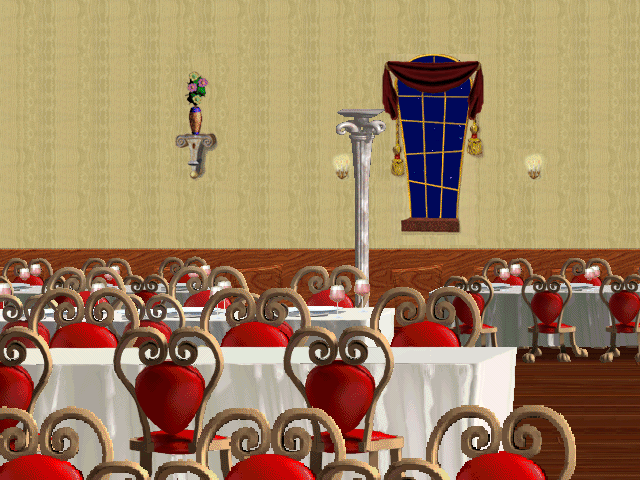 ETA: oh yes, and this pretty much puts the kibosh on all edited JCS screenshot theories. ETA2: A line of code for your amusement: Code:
for (byte k = 0; k < 4; k++) alphaAtlas[i % 10 * 128 + i % 1030 / 10 * 40960 + j % 128 + j / 128 * 1280 + k] /*= alphatile[j + k]*/ = (k == 3) ? (j2l.J2T.TransparencyMaskJJ2_Style[Array.BinarySearch(j2l.J2T.TransparencyMaskOffset, 0, (int)j2l.J2T.data3Counter, j2l.J2T.TransparencyMaskAddress[i])][j / 4] == 1) ? ((transp) ? (byte)192 : (byte)255) : (byte)0 : pixel[k];Code:
for (byte k = 0; k < 4; k++) alphaAtlas[i % 10 * 128 + i % 1030 / 10 * 40960 + j % 128 + j / 128 * 1280 + k] /*= alphatile[j + k]*/ = (k == 3) ? (((source == TransparencySource.JCS_Style) ? J2T.TransparencyMaskJCS_Style : J2T.TransparencyMaskJJ2_Style)[Array.BinarySearch(J2T.TransparencyMaskOffset, 0, (int)J2T.data3Counter, J2T.TransparencyMaskAddress[i])][j / 4] == 1) ? ((transp) ? (byte)192 : (byte)255) : (byte)0 : (((source == TransparencySource.JCS_Style) ? J2T.TransparencyMaskJCS_Style : J2T.TransparencyMaskJJ2_Style)[Array.BinarySearch(J2T.TransparencyMaskOffset, 0, (int)J2T.data3Counter, J2T.TransparencyMaskAddress[i])][j / 4] == 1) ? pixel[k] : (i == 0 && k == 0) ? (byte)72 : PinkTransparentColors[k] ; |
Quote:
|
Nothing is finalized, and there's a whole lot of missing functionality (e.g. displaying the tileset, any editing tools at all), but I managed to embed the level display in an editor window, so that's progress! Progress with working scrollbars, no less!
 |
A save as image function too? This is looking great, can't wait for a functioning release.
|
If I can make a suggestion, I would appreciate an option to turn off the darkening of tiles where events are, so that only the text remains.
|
Well I'll be, I want this thing.
Gimme now. |
It will contain a possibility to edit text strings from the event viewer, right?
|
Obi1: Not implemented yet by any means, but I don't imagine it'll present any serious difficulty since I'm already rendering levels at any resolution at all and the two are pretty much the same.
DoubleDJ: Right now the way I'm doing the event text makes that more difficult than it should be, but said way is also getting increasingly unsustainable the more I think about it, so hopefully I'll find a way to make that possible. It won't show up against all backgrounds very well, but I guess that's why it would be an option. EDIT: Stopped derping and started rendering the different difficulty levels by appealing directly to GL.Color4, rather than wasting time generating every texture four times, so now I feel much more comfortable continuing to use textures for event names. Consider this an easy addition! Jake: Not a high priority, but sure, that can happen. I think something similar is in that big thread full of interface suggestions. :) I'll probably put up a downloadable version once the very most basic level editing functionality is in place, mostly just to get reports of whether it messes up loading or saving any particular level, since I'm only really testing it on a pretty small set and conceivably there's something I just haven't thought of. From there, priorities will continue along the lines of replicating everything else JCS does and then building off of that, aside from certain features that just complement each other well (no point in adding an Undo button and then not adding Redo until some time later). Version changing is the exception so far because it has to be well integrated with saving. ETA: If anyone wants to be super duper helpful, I don't know how Animaniacs events work, nor the structure of 1.00g/h .LEV files at all, but would love to write code supporting them given some proper specs. ETA2: A question for y'all. As you've probably noticed, tile 0 uses a different color in JCS than the transparency of every other tile. However, the difference is between 72,48,168 and 79,48,168, and that's really small. Would it be best to make a more dramatic difference, leave the colors as is, or make all transparency look the same? |
I think you should make tile 0 all black in the tileset display.
|
I really do not find that attractive at all.
 |
What... only in the tileset display, not the editing display. Or did you program it differently?
|
In JCS, at least, the same transparency color scheme is used for both tileset and level display, and that's definitely the simplest to program, but a black square certainly could be hacked in. That said, I think the best approach is consistency, since it's reassuring when the tiles you select look the same as the tiles you place. Also the Jazz purple is a pretty rare color as far as tileset design goes, whereas black... well...
 |
I have really no idea how difficult it would be, but what about making it changeable by the user? I mean, the colours would be the same normally, but the user could set an option to put them in contrast...
|
Oh, yeah, I could do that too. This is going to have such a glorious .ini file at this rate.
|
Or you put an alternating white and grey checkerboard in place of tile 0. It's the generally accepted depiction of transparency.
|
I'm fine with the standard purple, but giving users a choice would be good.
|
I guess choice is always nice.
|
Let people choose a picture for the transparent tile, problem solved :P
|
comment: you have such a wonderful variety of terrible, awful tilesets. i hope you still have the green pikachu one.
question: will this end up compatible with linux? will it at least be runnable on wine? i guess you probably don't know, that's fine. i dearly look forward to making ridiculous animated crap not being a pain in the butt. thanks in advance. one feature i would personally like that i don't believe has been mentioned: the ability to show tile masks at the same time as their graphics (by overlaying the mask with 75% transparency or somesuch). |
I think Mac/Linux compatibility will be possible, but I haven't started in on it yet. One thing I believe I'll need to do is make it a lot clearer what endianness I expect when working with the .j2l and .j2t files.
Animations: Yeah, I don't really know how that's going to work, so I'll probably look through the giant idea thread for interface suggestions. People apparently don't like sliders, and you should be able to delete animated tiles without messing up all the lower ones, but I don't presently know what else should happen on that front. Masks: That's an interesting idea and I'll see how it would look. |
Another interface question, y'all: JCS uses Control+V to toggle displaying events (and similarly Ctrl+M for masks). Does anyone use this shortcut? I'd really be more comfortable with Control+V meaning "paste," and finding some other key combo for toggling event display, although nothing else would be quite as intuitive.
ETA: actually, screw it. Paste wouldn't be a useful hotkey anyway. |
Never used these shortcuts myself, though I am aware they exist.
|
It wouldn't hurt to add Ctrl+C and Ctrl+V as alternatives to grab and paste for newer users, I think.
|
I wasn't aware they existed, so it should be fine to replace. Perhaps Ctrl-N for the events, since it's next to M.
|
Ah, but Ctrl+N is New (Level), and that's actually a fairly standardized usage.
Anyway, I'm putting that off by working on the event selection window. This time around, you'll get to define your own personal event tree (although of course the old JCS categories will come as default). Also you can't type things that aren't numbers in the edit boxes; fun stuff! Not totally sure what to do with that stupid Illuminate Surroundings checkbox; maybe I'll just leave it in in hopes that blur will someday make it work for events besides Extra Live. |
Oh, whoops, forgot entirely about New.
|
Quote:
|
| All times are GMT -8. The time now is 03:48 AM. |
Powered by vBulletin® Copyright ©2000 - 2026, Jelsoft Enterprises Ltd.
JCF © 2001-Infinity Jazz2Online